Business E-Mail Compromise investigations in Microsoft 365 are fundamentally log-driven forensic investigations. Every conclusion depends on correlating events across multiple services over time.
In real world DFIR engagements, the main challenge is not analyzing a single user. The challenge is applying the same forensic methodology consistently across many users, often under time pressure and with evolving scope.
This article presents a practical DFIR workflow built around MAGIC, showing how data is exported at scale and then analyzed using Timesketch and Jupyter to produce both investigative insights and report-ready outputs.
The Role of MAGIC in DFIR Investigations
MAGIC Microsoft Azure Graph Information Crawler is a Python-based wrapper around the Microsoft Graph SDK designed to extract incident-response-relevant data from Microsoft 365.
It produces a single consolidated JSONL file that can be directly ingested into Timesketch or OpenSearch.
MAGIC deliberately focuses on one thing:
consistent and scalable forensic data acquisition
Operational Advantages of MAGIC
Beyond data quality and scale, MAGIC provides practical operational benefits that matter in real incident response work.
- Fully Python-based workflow: Collection, transformation, and enrichment run in a Python toolchain, which integrates naturally into existing DFIR automation and CI-style workflows.
- No Windows client dependency: Analysts do not need Outlook desktop clients, Exchange admin consoles, or other Windows-only tooling to start evidence collection and first-level triage.
- No complex interactive sign-in flow: Authentication is handled through Microsoft Graph API application credentials defined in configuration, enabling repeatable execution across tenants and investigation phases.
These points reduce setup friction, improve reproducibility, and make it easier to run the same investigation logic from analyst workstations, jump hosts, or controlled response environments.
Practical Workflow in an Investigation
In our investigations, we follow a consistent workflow that separates data acquisition, correlation, and analysis into clearly defined steps. In BEC cases, the scope often evolves as additional affected users are identified or new evidence emerges. By keeping the workflow stable, we ensure that expanding the investigation does not require changing tools or adapting the methodology under pressure.
MAGIC serves as the entry point to reliably collect all relevant data in a consistent structure. This data is then imported into Timesketch, where it becomes part of a unified timeline that allows analysts to correlate events across users and services. From there, Jupyter notebooks are used to perform structured analysis, validate hypotheses, and prepare clean, report-ready outputs. This separation reduces complexity, minimizes manual errors, and allows investigators to focus on understanding attacker behavior rather than dealing with inconsistent data handling or manual report formatting.
An important advantage of this approach is that the same timeline can include non-M365 artifacts. In practice, this means Microsoft 365 telemetry can be correlated with endpoint/client logs, file execution events, or browser history entries from a device to validate attacker activity end to end.
Our workflow used in practice is:
- Define scope and timeframe
- Export data with MAGIC
- Import into Timesketch
- Perform timeline analysis
- Deep dive using Jupyter notebooks
- Optionally return to step one as new evidence is identified
- Generate report‑ready outputs
Configuring and Running MAGIC
MAGIC is configured using a simple YAML file. The configuration explicitly defines the investigation scope and ensures reproducibility.
Example configuration:
settings:
  auth:
    client_secret:
    client_id:
    tenant_id:
  defaults:
    user_principal_names: # define users scope
    date_start: # define a default date range
    date_end:

crawl:
  - type: m365_ual
    search_name_prefix: DataCrawler
    date_start:
    date_end:
    keyword:
    service:
    user_principal_names: # datatype: list
    record_types: # datatype: list
    operations: # datatype: list
    ip_addresses: # datatype: list
    #number_interval_days: 1

enrich:
  timesketch:
    enabled: True
    output_filename: timesketch.jsonl
This configuration captures a key DFIR principle:
the scope of evidence collection is explicit and documented
Execution is intentionally simple:
magic -c config.yamlThe result is a single JSONL file containing all relevant log data for the defined scope, which can optionally be enriched using IP intelligence datasets or converted into a Timesketch-ready format.

Timeline Analysis in Timesketch
After ingestion into Timesketch, investigators can immediately begin correlating events across different log sources.
In practice, timeline-first investigation has a major tactical benefit: it prevents tunnel vision. Instead of validating one indicator at a time, analysts can see authentication, mailbox, and activity events in temporal context and quickly test alternative hypotheses as new facts emerge.
Typical investigative steps include:
- Identifying suspicious sign-in activity
- Correlating authentication events with mailbox actions
- Tracking attacker activity across sessions and timestamps to avoid missing behavior that is not tied to known IP or session indicators
- Comparing behavior patterns across multiple users
Because MAGIC already normalizes the data, all events are aligned within a single timeline. This removes the need for manual correlation and allows analysts to focus entirely on understanding attacker behavior.
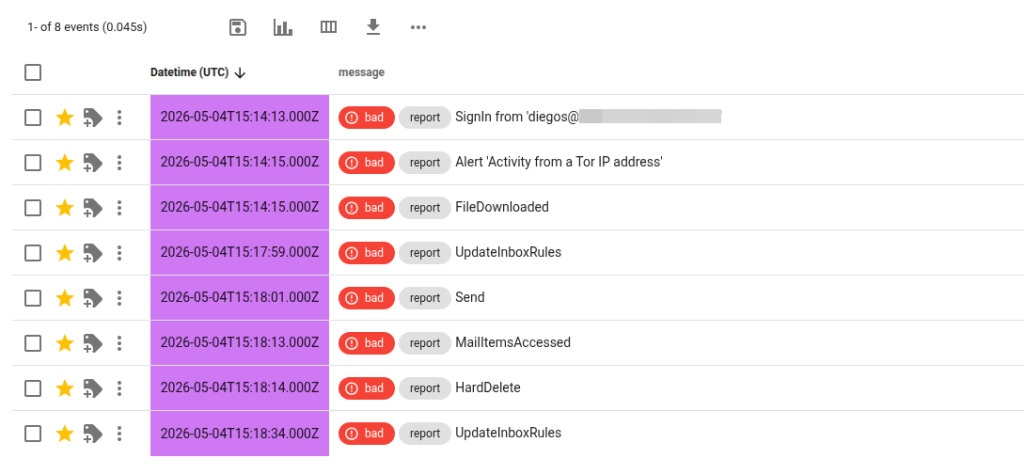
When additional data sources are available, the same timeline can be extended with non-M365 events. This allows direct cloud-to-endpoint pivoting, for example from suspicious mailbox access to local file execution or browser activity on a potentially compromised device.
Deep Analysis with Jupyter Notebooks
While Timesketch is ideal for exploration timeframes, Jupyter notebooks enable structured and repeatable forensic analysis.
This is especially valuable when the investigation scope expands. Notebook-based analysis can be rerun with adjusted user lists, timeframes, or enrichment logic without rewriting the methodology, which helps teams stay consistent even under pressure.
Two practical examples illustrate how MAGIC data is used.
Detecting Session Hijacking through IP Switching
A common pattern in BEC incidents is session reuse combined with changing source IP addresses.
Using Jupyter, sign in data can be grouped by session and analyzed for IP changes:
Example output:
| SessionId | OriginalClientIP | all_ips | UserId |
| 0040ba6a-69ab-3258-c0d6-c07b8537cd0e | 192.42.116.xx | 217.233.15.x, 192.42.116.xx | diegos@xxxxx.onmicrosoft.com |
This allows analysts to identify:
- Sessions where IP addresses change unexpectedly
- Potential token reuse or session hijacking
- Differences between legitimate user movement and attacker activity
While IP changes can be legitimate, this view quickly highlights sessions worth deeper investigation.
Enriching Sign In Data for Threat Context
Another common analysis step is enriching IP addresses with additional context such as geolocation and infrastructure usage.
Example enriched dataset:
| Date (UTC) | User | IP | UserAgent | AppDisplayName | SessionId | country | city | tor | vpn | proxy | hosting | Source |
| 04.05.2026 15:17:57 | diegos@xxxxx.onmicrosoft.com | 192.42.116.xx | Mozilla/5.0 (Windows NT 10.0; Win64; x64) AppleWebKit/537.36 (KHTML, like Gecko) Chrome/123.0.0.0 Safari/537.36 | Microsoft Teams | 0040ba6a-69ab-3258-c0d6-c07b8537cd0e | The Netherlands | Utrecht | True | False | True | False | SignInLogs |
| 04.05.2026 15:17:57 | diegos@xxxxx.onmicrosoft.com | 192.42.116.xx | Mozilla/5.0 (Windows NT 10.0; Win64; x64) AppleWebKit/537.36 (KHTML, like Gecko) Chrome/123.0.0.0 Safari/537.36 | Microsoft Teams | 0040ba6a-69ab-3258-c0d6-c07b8537cd0e | The Netherlands | Utrecht | True | False | True | False | UAL |
This enables quick identification of:
- Logins from unexpected geographies
- Suspicious infrastructure such as VPNs or hosting providers
- Patterns across multiple users
Instead of inspecting raw logs, analysts work with enriched and aggregated datasets, which significantly speeds up investigation.
Generating Report-Ready Output
A major benefit of using Jupyter in this workflow is the ability to produce clean, structured outputs for reporting.
Using tagged events from Timesketch or filtered MAGIC data, analysts can generate tables that:
- Focus only on relevant events
- Follow a consistent format
- Can be directly used in customer reports
This eliminates the need to manually copy and clean forensic data, which is:
- Time consuming
- Error prone
- Difficult to standardize
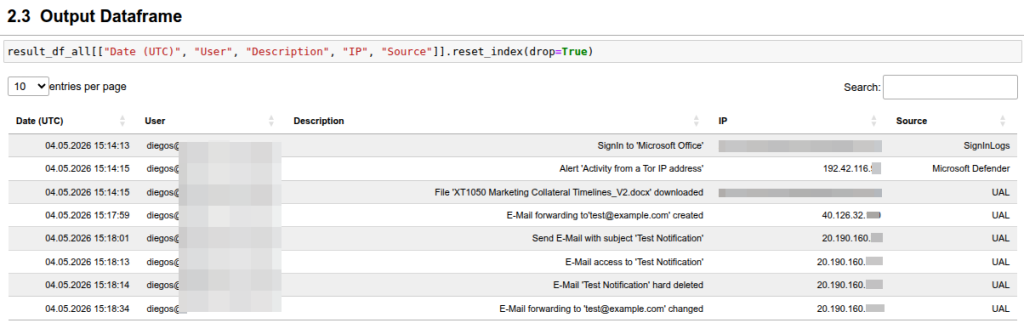
This step bridges the gap between technical investigation and professional reporting, which is often underestimated in DFIR work.
From Investigation to Reusable Knowledge
A practical side effect of this workflow is that investigative output does not remain tied to a single case. Findings can be converted into reusable analytical assets that improve consistency and speed in future engagements.
In practice, patterns identified during investigations can be turned into:
- Saved searches in Timesketch
- Reusable notebook templates
- Improved scoping strategies for future incidents
This creates a cumulative effect: each incident contributes not only case-specific conclusions, but also better analytical building blocks for the next investigation. Over time, Jupyter-based investigations become faster, more standardized, and easier to scale because past incidents actively improve future ones.
Conclusion
Scalable BEC investigations in Microsoft 365 require more than access to logs. They require a workflow that ensures consistent acquisition, efficient correlation, and structured analysis of multiple data sources.
MAGIC addresses the most critical bottleneck: getting the right data, in the right format, at scale.
Combined with Timesketch and Jupyter, it enables DFIR teams to move efficiently from data collection to investigation and reporting without changing methodology.
The same approach also scales beyond Microsoft 365 data alone: by adding endpoint or client-side artifacts into the same analytical workflow, teams can correlate cloud and device evidence in one place and strengthen investigative confidence.
Operationally, the Python-only implementation and Graph API-based access model also lower deployment complexity: no Windows-only analysis workstation is required, and no fragile interactive authentication sequence is needed for each run.
The project is available as open source: https://github.com/SVA-Cybersecurity/magic