ClickFix Did It Again
We’ve been tracking ClickFix and its growing family of variants in our SOC for about two years now. At some point last year, our SOC colleagues were already wondering if ClickFix was still worth talking about. By now, you might expect both security teams and users to know one simple rule: no legitimate website will ever ask you to paste something into a terminal. Then the Berlin government was hit by a cyberattack using exactly this kind of technique
1. Background: A Confirmed Incident
On September 4, 2026, Germany’s Federal Office for Information Security (BSI) confirmed that a state institution’s network had been compromised in August 2026. The intrusion stages matched a campaign that Microsoft’s Threat Intelligence team had documented shortly before, on August 28, 2026, under the name TerminalFix. The German agency also reported that the attackers attempted to deploy ransomware and exfiltrate data as part of a double-extortion scheme.
BSI attributes the malware used in this incident to the Rhysida ransomware group, which is a financially motivated group, whose operations are tracked elsewhere as Vice Spider, Vanilla Tempest Vice Society, or DEV-0832. BSI states that no direct link to state-sponsored or politically motivated actors has been established. In other words, this is financially driven cybercrime, not espionage.
BSI did not name the affected institution. The timing of the paper, however, coincides closely with the widely reported compromise of the Berlin state administration (Berliner Verwaltung), whose data was published on a ransomware leak site in early September after a ransom deadline expired.
Why this matters beyond this incident: TerminalFix, mentioned in the BSI paper, is just one version of a technique attackers have been using more and more over the last two years. Understanding how it works helps us detect and defend against similar attacks, even when the next campaign looks slightly different or has a different name.
2. The Attack Chain
Based on BSI’s technical paper and Microsoft’s original blog, the TerminalFix chain unfolds in eight stages:
- Lure: A user is directed to a compromised or watering-hole website via social engineering, phishing or simply a site they usually visit, and is prompted to complete a fake CAPTCHA (I am not a robot!) or verification check.
- Self-execution: The page instructs the user to open PowerShell or Windows Terminal, and paste a (usually in base64 encoded) command that has been silently copied to their clipboard. A fake “verification successful” message appears immediately to suppress suspicion.
- Payload delivery: The pasted command downloads, extracts, and runs a ZIP file.
- DLL sideloading: The file contains a legitimate signed executable alongside a malicious DLL, which loads via DLL-sideloading when the executable is clicked on.
- Steganographic payload retrieval: The DLL runs further PowerShell activity and downloads PNG images from attacker infrastructure. These images carry additional code hidden in their pixel data, which is reassembled and executed at runtime: entirely in memory, without writing a detectable binary to disk.
- Persistence: A Registry Run key, a recurring scheduled task, and hidden files and directories are created.
- Reconnaissance: The attacker performs enumeration of the Active Directory environment. This means that domains, permissions, servers, and backup systems are checked in order to assess the value of the compromised host for further attacks.
- Exfiltration staging and reverse tunnel: Cloud storage, for example an Azure Blob container, is prepared for data exfiltration using vendor-provided utilities such as the legitimate tool AzCopy. In parallel, a Python runtime is dropped and used to establish a reverse tunnel to attacker infrastructure over TLS and WebSocket on port 443. Commands relayed through this channel may not be logged by standard endpoint tooling.
The rest of this post focuses on stages 1–2, the ClickFix and TerminalFix lure mechanics, and stages 3–4, PowerShell as the execution vehicle. These are the stages every organization can realistically train users on and tune detections against. Stages 5–8 are covered in depth in Part 2, where we reconstruct the full chain in a controlled lab and document what each stage looks like.
3. ClickFix in Detail
ClickFix is not a software exploit or a tool. It is a social engineering pattern that turns the victim into the payload delivery mechanism. Instead of exploiting a software vulnerability or relying on a malicious email attachment, the attacker presents a plausible, low-friction “fix” for a problem that does not actually exist:
- A fake CAPTCHA or “verify you are human” overlay
- A fake browser or document rendering error
- A fake “your download is ready, one more step required” prompt
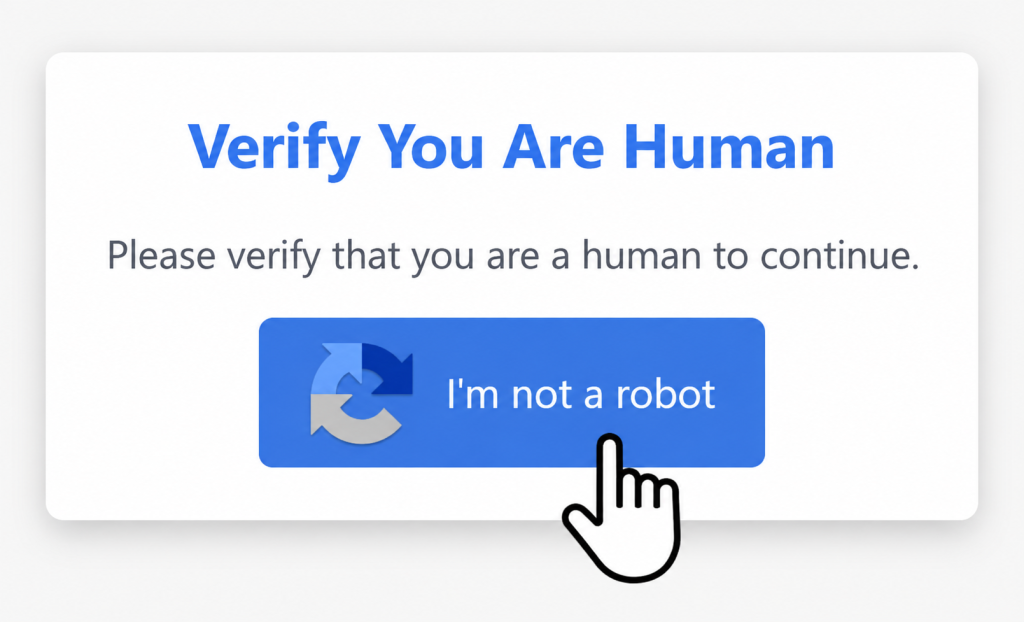
Most TerminalFix lures visually mimic a Cloudflare Turnstile widget, the small “I’m not a robot” checkbox that millions of users click through without a second thought every week, precisely because it is so mundane.
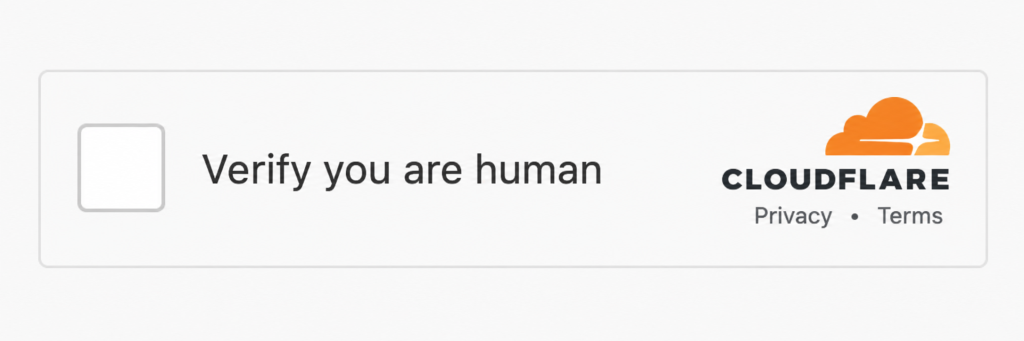
The page is designed to look familiar, so the victim follows the instructions without thinking too much about them.
It guides the user through a few simple steps: click the checkbox, open a dialog or application, paste something, and press Enter.
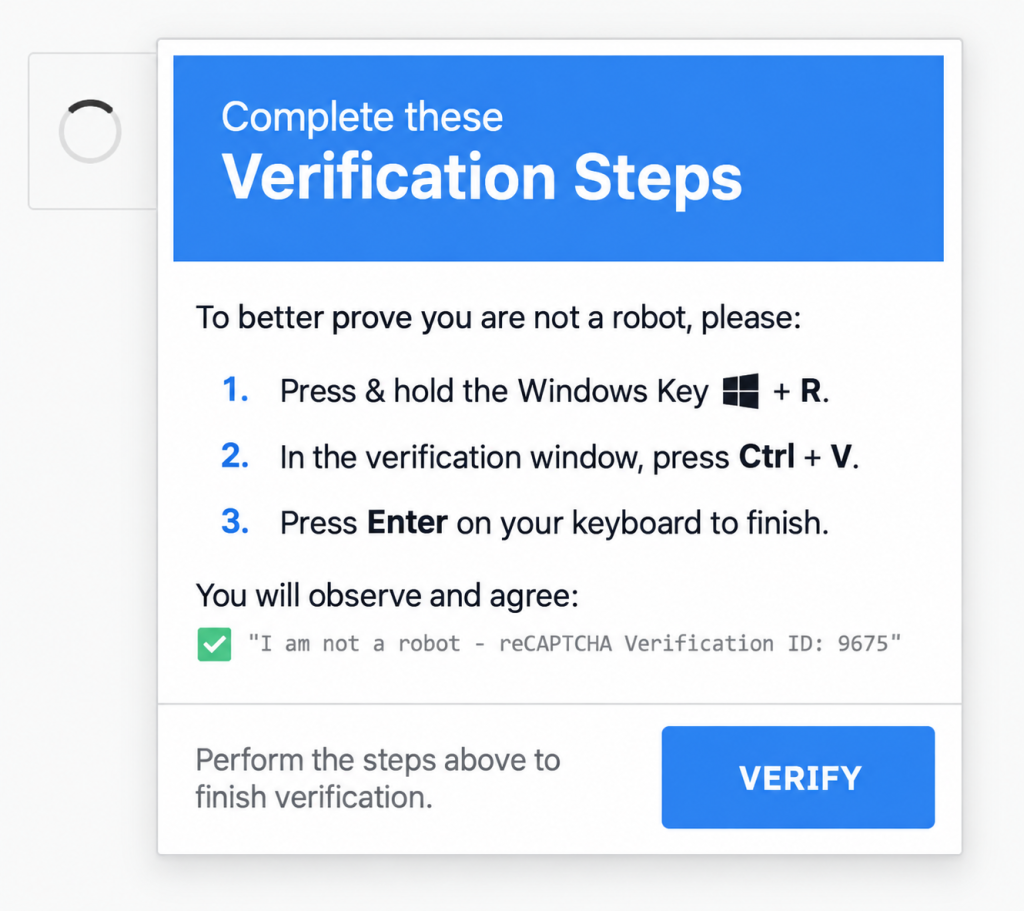
Because the user performs these actions themselves, the attack can bypass many common security controls. For instance, there is no malicious email attachment or suspicious download to scan. Instead, the victim manually enters or pastes the command, making it harder for some traditional security tools to detect. Some EDR tools flag this as malicious though.
The Clipboard Trick: How the Command Gets There Without You Noticing
A common question we are usually asked: if the victim never copied the command, how does it get into the clipboard?
The answer is the browser’s Clipboard API. This is a normal browser feature used by “Copy to clipboard” buttons on websites.
A website can use navigator.clipboard.writeText() to copy text to the user’s clipboard without the user noticing.. Browsers generally require this action to be connected to a recent user interaction, such as clicking a button.
ClickFix pages take advantage of this behavior. The fake CAPTCHA gives the victim something to click and this click can also trigger the website to copy the attacker’s command to the user’s clipboard.
From the victim’s point of view, they only clicked the CAPTCHA. But the command is now in their clipboard, ready to be pasted in the next step.
// Simplified illustration of the pattern — payload redacted
document.getElementById("captcha-checkbox").addEventListener("click", () => {
navigator.clipboard.writeText("");
showFakeSuccessState(); // immediately shows a fake "verified" checkmark
});
From the victim’s point of view, they simply clicked a checkbox and saw a green checkmark. Nothing looks suspicious.
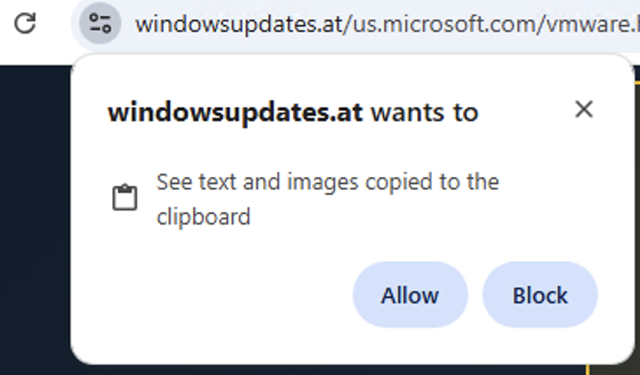
In the background, however, that same click was used to copy a command to the clipboard. There is no permission pop-up or obvious warning, so the victim does not realize that anything else happened.
Besides EDR flagging this as suspicious, there are tools that also display a warning, such as:

Older ClickFix versions use another browser function called document.execCommand('copy'). It usually copies the command from a hidden text field. The technique is different, but the result is the same: the command is placed in the victim’s clipboard automatically.
The fake success message is also important. It makes the victim believe everything worked as expected, so they are less likely to question or inspect what they are about to paste.
This helps explain why ClickFix became so popular with attackers since 2024. It is simple and cheap, works on different browsers and operating systems, and does not require exploiting a software vulnerability. Instead, it misuses normal browser features together with social engineering.
4. Variants and Real-World Cases
One important point: the main difference between classic ClickFix and TerminalFix is not how far the attack can spread. Traditional ClickFix attacks have also been used to compromise entire networks.
The difference is that TerminalFix includes additional steps as part of the attack from the beginning. These can include gathering information about the system and network, creating a remote connection, and establishing persistence.
With classic ClickFix, these steps depend more on what the attacker decides to do after gaining initial access. With TerminalFix, they are built into the attack chain by design.
Where the Lure Sends the Victim
Classic ClickFix — Windows Run dialog. The original and still most common form, publicly documented as early as September 2024. The victim is directed to press Win+R, paste into the dialog, and press OK.
TerminalFix — Windows Terminal or PowerShell. Directing the victim to a full terminal session removes the main practical limitation of the Run dialog and opens the door to multi-stage execution chains directly from the first pasted command.
Browser console variants (FileFix-style). The victim is instructed to open the browser’s developer console and paste JavaScript there instead of leaving the browser entirely.
macOS. ClickFix is not Windows-only. A macOS-targeting variant was documented in April 2026 (and also confirmed by our SOC), adapting the same social engineering pattern to Terminal.app and delivering a Mac stealer called SHub Stealer.
5. Stay vigilant: what users can notice
Because ClickFix depends on the victim following the attacker’s instructions, recognizing the warning signs can help stop the attack. User awareness does not replace technical security controls, but it provides an important first line of defense.
You are asked to type or paste a command.
A legitimate CAPTCHA, browser update, or document viewer should never ask you to open a terminal, Run dialog, PowerShell, or developer console and paste a command.
The verification finishes unusually quickly.
Some fake pages show a success message immediately after a click, even though no real verification has taken place.
The website says something is already copied to your clipboard.
Be suspicious if a website tells you that a command or code has been copied and then asks you to paste it somewhere else.
The instructions become increasingly technical and complex.
For example: “Open Run,” “Open Terminal,” “Start PowerShell,” or “Run as Administrator.” Normal verification processes do not require these steps.
The page creates urgency.
Messages may use technical language, warnings, or time pressure to make you follow the instructions without stopping to think. This is a common social-engineering technique.
6. Why PowerShell
PowerShell remains a popular tool for attackers during the execution stage. This is not specific to TerminalFix. Why is it so popular by attackers?
It is already installed.
PowerShell is included with Windows, so attackers do not need to install another tool before using it.
It is powerful.
PowerShell can download files, run code, interact with .NET, and modify files or Windows settings. This gives attackers many possibilities using a tool that is already part of the operating system.
Detection is possible, but attackers try to make it harder.
Windows and security products can monitor PowerShell through features such as Script Block Logging and AMSI. Attackers therefore often use techniques designed to hide their activity or reduce visibility.
Examples include:
- Encoded commands: Make commands harder to understand during a quick review.
- Dynamic execution: Code can be constructed and executed without storing a complete script on disk.
- AMSI bypass attempts: Attackers may try to interfere with the security interface used to inspect PowerShell scripts.
These techniques are not new. What TerminalFix changes is the way PowerShell is initially used. A full terminal gives the attacker much more room for complex commands than the small Windows Run dialog.
As a result, a single copy-and-paste action can start a more complex attack chain.
7. Prevention
There is no single security control that can stop the entire attack chain. The best approach is to use several layers of protection so that if one fails, another can still detect or block the attack.
- User awareness: Teach users one simple rule: legitimate websites should never ask them to open PowerShell, Terminal, or the Run dialog and paste a command.
- PowerShell hardening: Limit PowerShell capabilities for normal users and, where possible, prevent users who do not need PowerShell or Windows Terminal from running them.
- Endpoint Detection and Response (EDR): Use EDR to detect suspicious behavior on the endpoint, such as unusual PowerShell execution, unexpected process chains, DLL sideloading, persistence mechanisms, credential access, or suspicious network connections. EDR can provide an important detection and response layer even when the user has already executed the command.
- Application control: Use technologies such as ASR, WDAC, or AppLocker to restrict suspicious applications and reduce the risk of techniques such as DLL sideloading.
- Web protection: Web filtering and browser isolation can help prevent users from reaching malicious or compromised websites.
- Network monitoring: Look for unusual outbound connections, especially connections to unknown infrastructure. Also monitor tools such as AzCopy on systems where they would normally not be used, such as domain controllers or backup servers.
- PowerShell monitoring: Enable AMSI and Script Block Logging and send the logs to a central SIEM. This allows the SOC to detect and investigate suspicious, encoded, or obfuscated PowerShell activity.
The main idea is defense in depth: prevent the initial action where possible, restrict what can execute, detect suspicious behavior, and limit what an attacker can access or exfiltrate.
9. Try It Yourself — and Read Part 2
Reading about ClickFix is one thing. Recognizing it when it actually happens is another.
We created a short and safe awareness demo that shows how ClickFix and TerminalFix work from the user’s perspective. Nothing malicious is executed, no real files are downloaded, and nothing leaves your browser.
You can try the demo at https://clickfix.fun
For those who want to understand the technical side, Part 2 of this article goes deeper. We recreated the complete eight-stage attack chain in a controlled Purple Team environment from the initial TerminalFix page to DLL sideloading, C2 communication, data exfiltration, and an active Mythic C2 beacon.
We also show what each stage looks like under the perspective of defenders, what was detected automatically, what required manual threat hunting, and where we had detection gaps.
This provides a practical way to compare the attack with your own detection capabilities and identify areas where additional detection or protection may be needed.
If you would like to understand how these techniques map to your own environment, contact our SOC team.
References
- Microsoft Security Blog, “TerminalFix campaign deploys a reverse tunnel through multistage intrusion”, August 28, 2026
- BSI, “Version 1.0: Deutsche Institutionen über TerminalFix-Kampagne kompromittiert”, September 4, 2026
- BleepingComputer, “Microsoft warns of TerminalFix attacks deploying reverse tunnels”, August 31, 2026
- Microsoft Security Blog, Think before you Click(Fix): Analyzing the ClickFix social engineering technique | Microsoft Security Blog , August 25, 2025
Note: Microsoft’s own telemetry covers the initial chain, reconnaissance, and reverse-tunnel stages; the ransomware deployment and data exfiltration outcomes described here were reported separately by BSI for the confirmed incident, not directly observed by Microsoft in the analyzed chain.