Part 1 explained how ClickFix and TerminalFix work from the attacker’s perspective.
In Part 2, we recreate the complete attack chain in a controlled environment, following the stages described in the BSI paper. For each stage, we also look at which security controls could have prevented or stopped the attack.
Part 3 focuses on detection: what the attack looks like in the logs, what a SOC can detect, and which detection (an deception) rules can be used to identify the different stages.
1. Why Build a Demo
Reading a BSI advisory is one thing. Seeing the attack happen in a lab is another.
The BSI paper (BITS-B Nr. 2026-287419-1032) describes the TerminalFix attack chain in eight stages based on the Microsoft research. But reading about those stages does not always show how quickly the attack develops, how normal some of the activity can look, or which security tools and log sources actually detect it.
That is why we built this demo.
Our goal was not to recreate the exact malware used in the incident described by the BSI. Instead, we reproduced the main techniques in a controlled environment. This allows our SOC team to test and improve our detections, use the knowledge gained to create better security advisories for our customers, and show non-technical stakeholders why simple advice like “don’t click suspicious links” is no longer enough.
Everything shown in this article was performed in an isolated and authorized lab environment. The demo can be seen in the video below.
2. Reconstructing the Chain — Stage by Stage
Stage 1 — The Lure Page
We built a TerminalFix lure page styled as a fake VMware vSphere Update Manager. The choice of VMware is deliberate: in enterprise environments, VMware update notifications are common enough that a plausible-looking update screen triggers far less suspicion than a generic CAPTCHA.
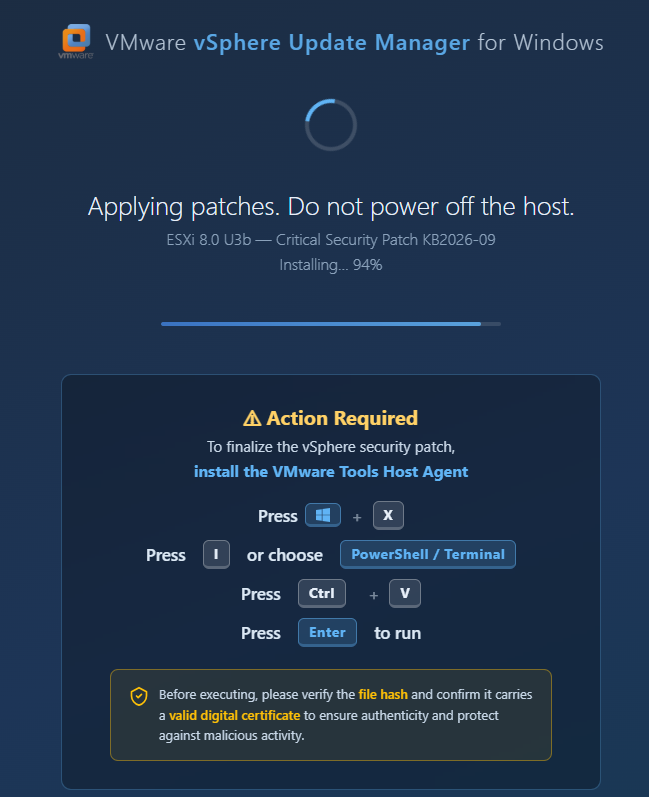
When the victim clicks the start button, the page does three things:
- Switches to fullscreen mode, hiding most of the browser interface and making the fake screen look more convincing.
- Copies a PowerShell command to the clipboard using
navigator.clipboard.writeText()— the same technique explained in Part 1. - Keeps refreshing the clipboard, so the command is still available if the user waits before opening the terminal.
Before the simulation starts, we show a clear security awareness message explaining what is about to happen. A real ClickFix campaign would obviously not include this warning. We added it because the purpose of our demo is education and training, not deception.
We also added an integrity notice to the fake update screen that asks the user to check the file hash and digital signature before running the file.
Interestingly, this can create a false sense of security. In a real DLL sideloading attack, the main executable may be a legitimate and digitally signed application. Checking its signature alone therefore does not guarantee that everything included with it is safe. This is one of the reasons DLL sideloading can be so convincing.
Stage 2 — Payload Delivery
The PowerShell command copied to the clipboard starts the next stage of the attack. It:
- Downloads a ZIP file from infrastructure controlled by the attacker.
- Extracts two files to the Desktop:
vm_update.exe,vmtools.dll(malicious) and some other bening dlls. - Starts
vm_update.exe: or, in our demo, asks the user to double-click the file after it appears on the Desktop.
The important part is that vm_update.exe itself is not malicious. It is a legitimate and digitally signed VMware executable.
This is one of the most interesting parts to demonstrate live. VirusTotal shows zero detections, the digital signature is valid, and the executable itself appears completely trustworthy.
But that does not mean the complete package is safe. The malicious behavior happens in the next stage, when the legitimate application loads the accompanying DLL.
Stage 3 — DLL Sideloading
When vm_update.exe starts, Windows needs to load several DLL files that the application depends on. Because of the way some applications search for these DLLs, a DLL placed in the same directory as the executable may be loaded instead of the expected legitimate version.
In our example, vmtools.dll is placed next to vm_update.exe on the Desktop. When the legitimate VMware executable starts, it automatically loads this DLL, and the malicious code inside it begins running.
This technique is known as DLL sideloading. The interesting part is that the executable itself can still be legitimate and digitally signed. The malicious code is executed through the trusted application, which can make the activity less obvious to both the user and some security controls.
A useful resource for understanding and detecting this technique is HijackLibs. The project maintains a curated list of applications and DLLs known to be candidates for DLL hijacking and also provides detection resources such as Sigma rules.
In our demo, once the DLL is loaded, its code starts immediately and launches several background tasks. From the victim’s perspective, however, nothing unusual appears on the screen.
This is what makes the stage interesting from a defensive perspective: a trusted executable starts, but untrusted code is running inside its process.
Stage 4 — Reconnaissance and Persistence
Within the first seconds after execution, the DLL collects some basic information about the system:
- The hostname and username
- The process ID
- The system’s unique MachineGUID
The next step is persistence making sure the malware starts again after a reboot.
For this, the files are copied to %APPDATA%\VMwareTools\, and a Windows Run key is created for the current user:
HKCU\Software\Microsoft\Windows\CurrentVersion\RunThis tells Windows to start vm_update.exe automatically whenever that user logs in.
An important detail is that administrator rights are not required. The persistence is created under HKCU (HKEY_CURRENT_USER), which belongs to the currently logged-in user.
At this point, simply rebooting the computer does not remove the threat. The executable will start again the next time the user logs in.
Stage 5 — Telegram Exfiltration (Small Files)
The first exfiltration method uses Telegram as its communication channel.
Instead of directly including the required Windows networking functions in the program, the DLL loads winhttp.dll only when it needs it. This can make the network functionality less obvious during a basic static analysis of the file.
The malware then connects to Telegram over HTTPS and:
- Sends basic information about the infected machine, including the hostname, username, process ID, and MachineGUID
- Searches the user’s Desktop for specific types of files
- Sends matching files smaller than 512 KB to an attacker-controlled Telegram bot
In our controlled lab test, seven files were transferred in approximately fourteen seconds.
This demonstrates how quickly data can leave an endpoint after the initial execution — and how attackers can abuse legitimate cloud and messaging services as part of an attack chain.
| File | Size |
|---|---|
passwords.txt | 3.4 KB |
id_rsa_server.pem | 1.1 KB |
markus_hoffmann.pgp | 1.1 KB |
Jumphost-SVA.rdp | 1.2 KB |
sva-vpn.ovpn | 1.6 KB |
infrastructure.conf | 2.6 KB |
Passwords.docx | 12 KB |
All of these are fake files we placed on the Desktop before the demo. The traffic to api.telegram.org is indistinguishable from a legitimate Telegram client session at the network layer: same HTTPS, same destination IP ranges, same port.
Stage 6 — Steganographic Payload Retrieval
The second background task uses a more unusual technique: steganography.
This is the vmware logo with powershell stager:

The DLL downloads a PNG image from windowsupdates.at, infrastructure designed to look like a legitimate update server. If someone opens the file, it behaves like a normal image and nothing looks suspicious.
However, hidden inside the image is additional data containing the next stage of the attack. This is done using LSB (Least Significant Bit) steganography, where very small changes are made to the color values of individual pixels. These changes are practically invisible to the human eye but can be used to store hidden information.
The DLL knows how to read this hidden data and reconstruct the embedded PowerShell stager. It can then start the next stage without downloading an obvious script or executable.
This is especially interesting from a defensive perspective. Looking only at the network traffic, we initially see something very ordinary: an HTTPS request downloading a PNG image.
There is no obvious executable download, no suspicious file extension, and the image itself opens normally.
This helps explain why the BSI specifically highlighted the steganography stage. Traditional controls that focus mainly on file extensions, known hashes, or obvious executable downloads may not immediately recognize what is happening.
The DLL downloads a PNG image from windowsupdates.at, infrastructure designed to look like a legitimate update server. If someone opens the file, it behaves like a normal image and nothing looks suspicious.
However, hidden inside the image is additional data containing the next stage of the attack. This is done using LSB (Least Significant Bit) steganography, where very small changes are made to the color values of individual pixels. These changes are practically invisible to the human eye but can be used to store hidden information.
The DLL knows how to read this hidden data and reconstruct the embedded PowerShell stager. It can then start the next stage without downloading an obvious script or executable.
This is especially interesting from a defensive perspective. Looking only at the network traffic, we initially see something very ordinary: an HTTPS request downloading a PNG image.
There is no obvious executable download, no suspicious file extension, and the image itself opens normally.
This helps explain why the BSI specifically highlighted the steganography stage. Traditional controls that focus mainly on file extensions, known hashes, or obvious executable downloads may not immediately recognize what is happening.
Stage 7 — C2 Beacon via CloudFront
The PowerShell stager starts the next stage by retrieving an Apollo agent, which is part of the Mythic command-and-control (C2) framework.
Instead of running the agent as a normal file from disk, it is loaded directly into memory. The agent then establishes an encrypted connection back to the attacker’s C2 infrastructure.
In our lab, this communication went through AWS CloudFront. This adds another layer between the infected endpoint and the real C2 server: from the network’s perspective, the endpoint communicates with CloudFront rather than directly with the attacker’s server.
In our test, the infected machine appeared in the Mythic operator console approximately eight seconds after vm_update.exe was started.
At this point, the attack has moved from initial execution to an active C2 session, giving the operator remote control of the compromised endpoint.
The important defensive lesson is the speed: within only a few seconds of the user starting what appears to be a legitimate application, an attacker can establish an interactive foothold on the system.
Stage 8 — Azure Blob Exfiltration (Large Files)
The third background task uses Azure Blob Storage as a second channel for data exfiltration.
It searches both the user’s Desktop and Documents folders for selected file types. Unlike the Telegram method, this channel is not limited to files smaller than 512 KB, making it suitable for transferring larger files.
We could have downloaded and used AZCopy as stated in the BSI paper. However, the transfer in our demo uses curl.exe, a legitimate Microsoft-signed tool commonly available on modern Windows systems. The attack also uses a preconfigured SAS token to authenticate to the Azure storage container.
This is another example of attackers using legitimate tools and trusted cloud services for malicious purposes. Individually, curl.exe and Azure Blob Storage are completely legitimate. The suspicious part is how, where, and why they are being used.
In our demo, this second channel successfully transferred larger files that were not sent through the Telegram channel.
| File | Size |
|---|---|
Acquisition_Strategy_CONFIDENTIAL.docx | 637 KB |
SVA_Emails_Confidential.eml | 1.1 MB |
sva_production_backup.sql | 634 KB |
The destination, *.blob.core.windows.net, is Microsoft-owned infrastructure used legitimately by thousands of enterprise applications every day. Without specific process-level correlation, this traffic is extremely difficult to distinguish from normal Azure-integrated business tooling.
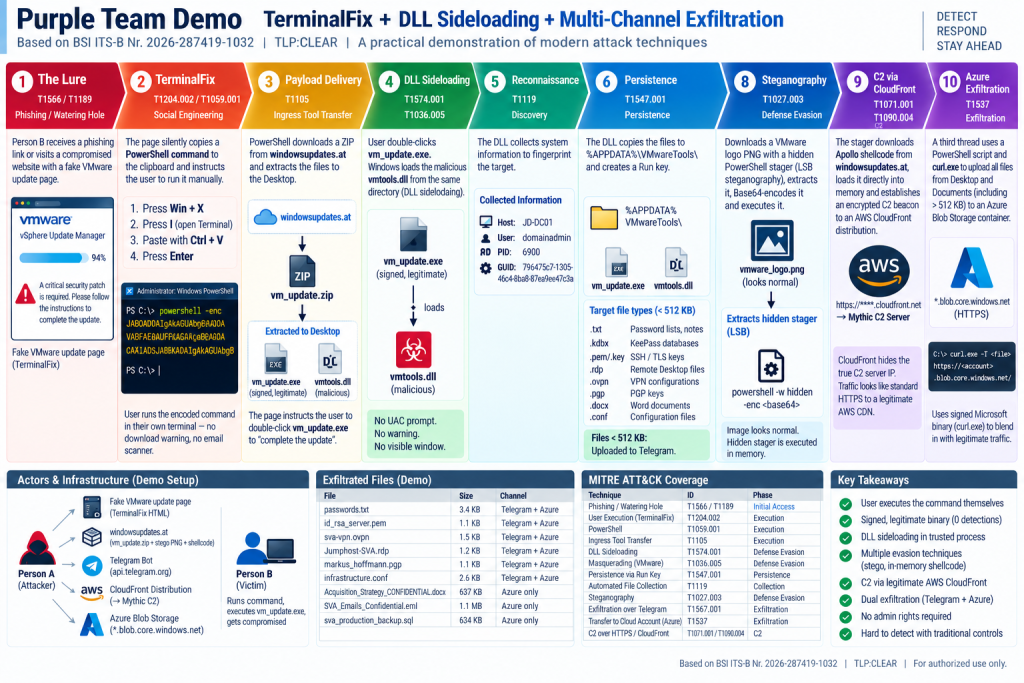
What the Full Chain Looks Like End to End
t = 0s vm_update.exe double-clicked
t = 0s DllMain fires — recon complete in < 1 second
t = 1s Persistence: Run key written, AppData copy complete
t = 2s Telegram beacon sent — hostname, user, GUID
t = 14s Telegram: 7 Desktop files exfiltrated
t = 3s PNG downloaded from windowsupdates.at
t = 3s LSB extraction — stager recovered from pixel data
t = 3s PowerShell stager executed — shellcode loaded into RAM
t = 8s Mythic C2 beacon established via CloudFront ✅
t = 30s Azure Blob: Desktop + Documents scanned
t = 60s Azure Blob: 3 large files uploaded ✅
The entire chain completes in under two minutes.
3. Prevention — What Actually Helps
Based on what we observed in the lab, the following is an honest assessment of which preventive controls would have broken the chain and at which stage.
| Control | Breaks chain at | Notes |
|---|---|---|
| EDR with ClickFix/TerminalFix detection | Stages 1–2 | Several vendors now detect the clipboard hijack and terminal execution pattern specifically |
| PowerShell Constrained Language Mode | Stage 2 | Most effective single technical control breaks stager entirely |
| Application control (WDAC / AppLocker) | Stage 3 | Prevents unsigned DLL load from user-writable paths |
| Restricting Terminal / PowerShell for standard users | Stage 2 | High friction for developers; very effective for restricted profiles |
| Web proxy with domain categorization | Stages 3 | Can block uncategorized/malicious domains before download, does not detect steganography itself |
Block outbound to api.telegram.org from non-browsers | Stage 5 | Easy win; low false-positive rate in most environments |
| Monitor Azure Blob PUT from endpoints | Stage 8 | Process-level correlation required; firewall-level blocking alone is not sufficient |
| Script Block Logging + AMSI centrally collected | Stage 2 | Visibility, not prevention, but essential for hunting |
| User awareness: “no page will ever ask you to paste a command” | Stages 1–2 | First line of resistance; does not replace technical controls |
EDR
Several endpoint detection and response platforms have added specific detections for the ClickFix and TerminalFix pattern over the course of 2026. What they target varies by vendor, but the common signals include:
- Clipboard write events from a browser process followed by a terminal or Run dialog opening within a short time window
- Encoded PowerShell execution (
-EncodedCommandor-enc) where the parent process isexplorer.exe, a browser, or another non-administrative process - DLL loads from user-writable directories (
Desktop,Downloads,AppData\Local\Temp) by signed binaries - Process injection patterns — shellcode loaded via
VirtualAlloc+CreateThreadcombinations that do not correspond to known-good application behavior
The effectiveness of these detections varies significantly by configuration and vendor. An EDR that is deployed but running in audit-only mode, or whose detections have been broadly suppressed to reduce alert volume, will not stop this chain. EDR is a strong layer when it is tuned — it is not a substitute for the hardening controls above.
The Two Controls That Mattered Most in Our Lab
PowerShell Constrained Language Mode for standard user profiles is the single most impactful technical control. It stops the stager, which stops the C2 beacon and the Azure exfiltration channel. It does not stop the Telegram exfiltration — that runs in native C++ inside the DLL — but it removes the attacker’s interactive access and the ability to run follow-on tooling.
Application control restricting DLL loads from user-writable paths would have stopped the entire chain at Stage 3. A WDAC or AppLocker policy that prevents unsigned DLLs from loading out of %USERPROFILE%\Desktop is effective, broadly applicable, and has no meaningful impact on normal user workflows.
4. Key Takeaways
The incident described in the BSI paper is an important example not because it uses completely new or highly sophisticated techniques, but because it shows how far an attacker can get using social engineering, trusted software, and standard Windows features.
Most of the techniques are already known. What makes the attack effective is how they are combined. ClickFix gets the victim to start the attack themselves, while the following stages use tools, applications, and services that can look legitimate when viewed individually.
Building the demo highlighted three things in particular:
Speed.
The attack moves extremely quickly. In our lab, the system established an active C2 connection only seconds after the user started the executable. This shows why relying only on manual analyst investigation is not enough. Prevention and automated detection and response are essential.
Legitimate tools and services.
Many parts of the attack initially look normal. The executable is legitimately signed, standard Windows components are used, and communication can involve well-known cloud services. The challenge for defenders is therefore not simply identifying “malware,” but recognizing when legitimate components are being used in an unusual or malicious way.
Multiple exfiltration channels.
The attack uses Telegram and Azure Blob Storage in parallel. Telegram provides a fast channel for smaller files, while Azure can handle larger documents. Blocking or detecting only one channel therefore does not necessarily stop the data loss.
The main lesson is that each individual action may look relatively harmless. The malicious activity becomes much clearer when the events are connected and viewed as a complete attack chain.
That is where the SOC becomes especially important.
Part 3 looks at what a SOC should actually detect.